Guides · n8n use cases
Collect the documents each case needs in n8n
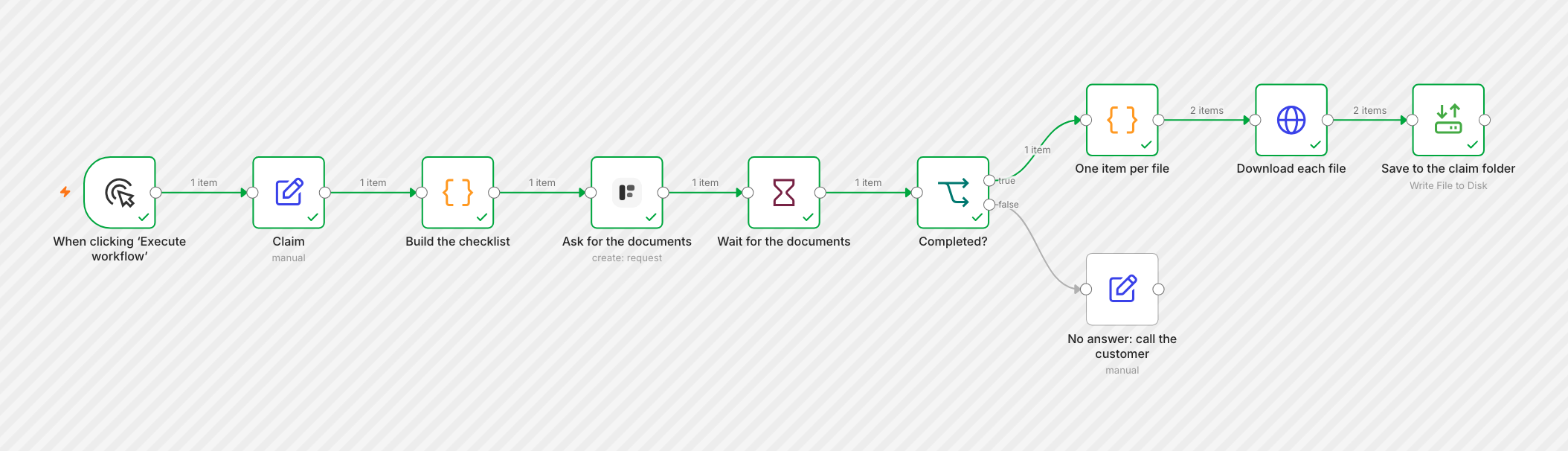
A water damage claim needs photos and a repair estimate; a theft claim needs a police report and receipts. Instead of one long form, the workflow builds the form from the claim's checklist, sends it, waits, and files every upload with the claim.
Last checked
The same steps work for onboarding, loans, rentals, visas: anything where the paperwork depends on the case. Checked on self-hosted n8n 2.44 with version 0.13.0 of the node.
Import it from
formstep-claim-documents.json
with Import from File. It needs no form in Formstep: the request builds one.
Before you start
The Formstep node on an n8n with a public HTTPS address, and a Formstep credential.
- Somewhere to keep the files. The example writes them to n8n’s disk; the last step shows Google Drive instead.
1. Start from the case
The example starts with an Edit Fields node named Claim: claimId, claimType (
water_damage or theft), claimLabel, firstName and email. In your
workflow, it is the record that opens the case: a CRM deal, a new row, a webhook from your claims system.
2. Turn the checklist into blocks
A Code node named Build the checklist looks up the documents for the claim type and writes the form as blocks: a greeting, two hidden fields the greeting reads, one file question per document, and a note.
const checklists = {
  water_damage: [
    { key: 'damage_photos', title: 'Photos of the damage', maxFiles: 10 },
    { key: 'repair_estimate', title: 'Repair estimate from a contractor', maxFiles: 1 },
  ],
  theft: [
    { key: 'police_report', title: 'Police report', maxFiles: 1 },
    { key: 'receipts', title: 'Receipts for the stolen items', maxFiles: 10 },
  ],
}
const documents = checklists[$json.claimType]
if (!documents) throw new Error(`No checklist for claim type ${$json.claimType}`)
const blocks = [
  { type: 'header', content: 'Hi {{first_name}}, a few documents for claim {{claim_id}}' },
  { type: 'paragraph', content: 'Upload each document below. Photos from your phone are fine.' },
  { type: 'hiddenField', key: 'first_name' },
  { type: 'hiddenField', key: 'claim_id' },
  ...documents.map((document) => ({ type: 'file', ...document })),
  { type: 'text', key: 'notes', title: 'Anything we should know?', required: false },
]
return { json: { ...$json, blocks } }
Each block takes type, a key and the options of its kind; {{first_name}} in text shows a hidden
field’s value. Every block type and option is in Create a form and a request in one call.
3. Send the request with a new form
Add a Formstep Create request node and set Form Source to New Form:
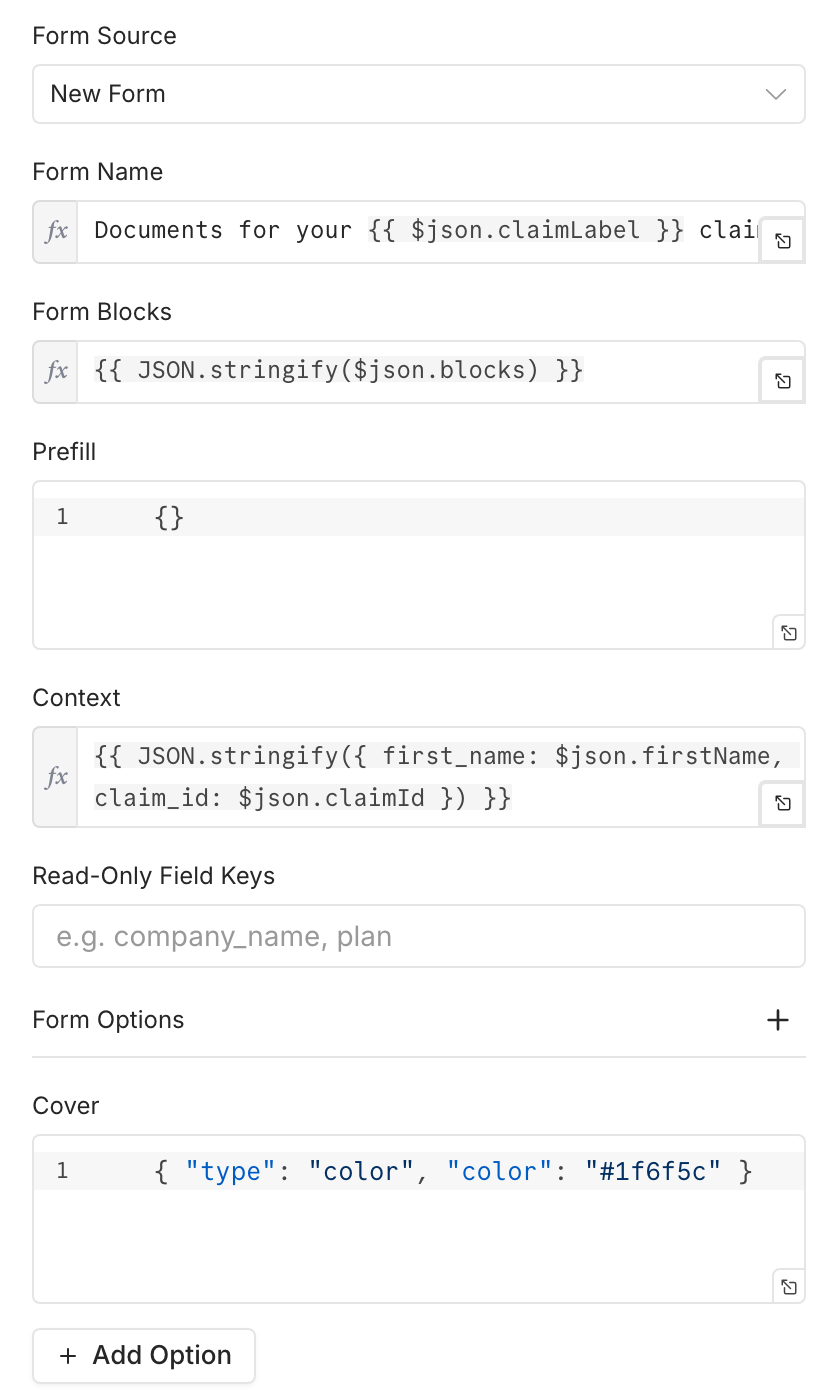
Form Blocks is
{{ JSON.stringify($json.blocks) }}, the blocks from the Code node.Context fills the hidden fields:
{{ JSON.stringify({ first_name: $json.firstName, claim_id: $json.claimId }) }}.Form Options gives it your brand: a cover color, a logo, a theme.
Set Recipient Email, turn on Wait for the Outcome, and under Additional Fields set Delivery, Expires At (
{{ $now.plus({ days: 14 }).toISO() }}) and an External ID. Test Mode is on in the example.
The customer sees only the documents their claim needs:
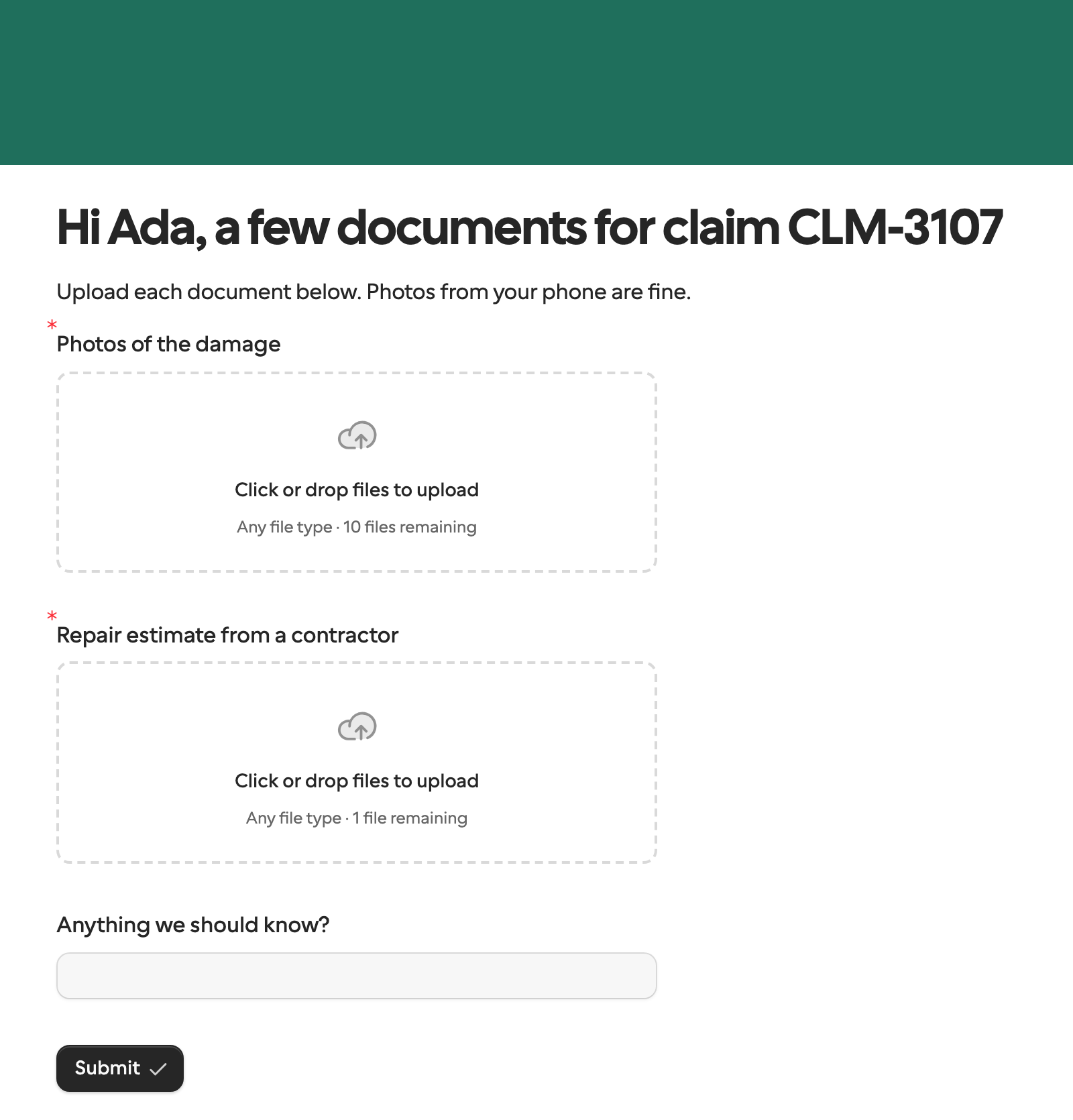
One checklist, one form
Formstep builds a form the first time it sees a definition and reuses it after that: the second water damage claim reuses the first
one’s form, and the response says form.reused: true. Keep what changes per customer, like the name and the claim ID, in
Context or Prefill, never in the blocks or the form name, or every request makes a new form. A
workspace makes at most 300 new forms a day this way. See One definition, one form.
4. Wait, then make one item per file
Add a Wait node (On Webhook Call) and an If node that checks
{{ $json.body.type }} is request.completed. Each file question’s answer is a list of files with a
name, a size, a type and a url. A Code node turns them into one item
per file:
// One item per uploaded file, named after the question it answers.
const event = $json.body.data
const items = []
for (const [question, answer] of Object.entries(event.answers)) {
  if (!Array.isArray(answer)) continue
  for (const file of answer) {
    if (file.url) items.push({ json: { question, name: `${question} - ${file.name}`, url: file.url } })
  }
}
return items
5. Download and save each file
An HTTP Request node downloads {{ $json.url }} with Response Format
File, once per item. The example then writes each file with Read/Write Files from Disk, as
/home/node/.n8n-files/{{ $('Claim').item.json.claimId }} {{ $json.name }}.
To keep them in Google Drive instead, replace that node with Google Drive › Upload file: Input Data
Field Name data, File Name {{ $json.name }}, and the claim’s folder as Parent Folder. S3, Dropbox and
SharePoint nodes take the binary field the same way.
Treat a file URL like a password
Anyone with a file’s url can download it, so do not post it in a channel or a ticket. Download the file, as here, and share
your own copy.
The event’s
data.submission.pdfUrl, a PDF of all the answers, is set only when the form keeps a PDF: when it has a Signature question or a webhook subscription. A request that only calls back, as here, has none.To send the customer a document to read or sign as well, use a published form with a Documents block, as in Get a manager’s approval. A new form takes no documents.