Submissions & Analytics
Self notifications
Email yourself or your team whenever someone submits your form. Customize the subject and body, and optionally attach a PDF of the response.
How it works
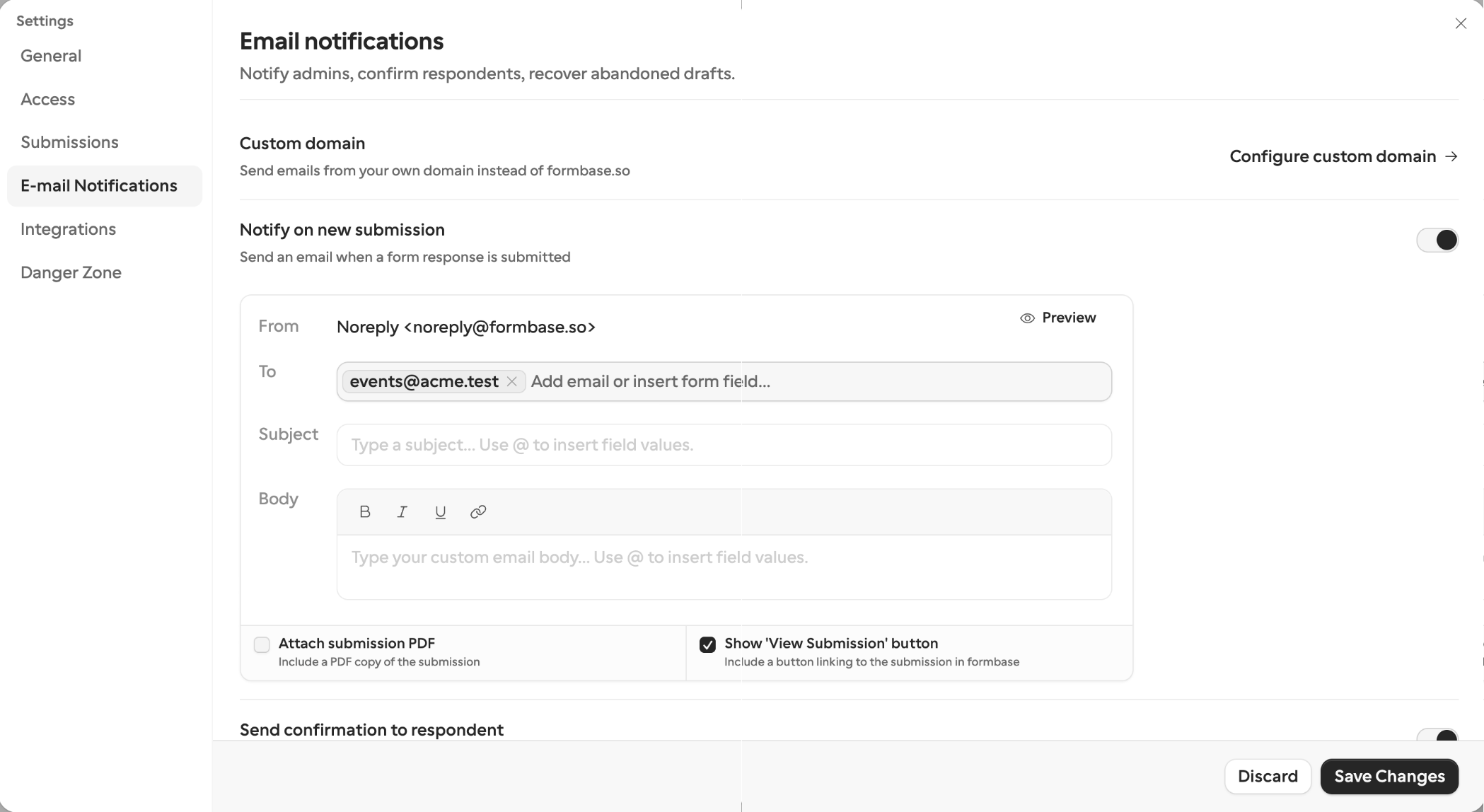
Self notifications alert you every time a submission comes in. Turn on Notify on new submission in Form settings → E-mail Notifications.
What each plan gets:
- Free and up — the notification to the workspace owner’s address, with a link to the submission.
- Pro and Business — extra recipients, the submission PDF attached, a custom subject and body with piped answers, and control over the “View Submission” button.
For the full setup — recipients, custom templates, template variables, and custom email domains — see Form settings → Self notification.
PDF attachment
Turn on Attach submission PDF under Notify on new submission to include a PDF copy of the response with every notification email. formbase generates and stores the PDF the moment the respondent submits, so it arrives with the email instantly. Attaching the PDF needs a Pro or Business plan.
The attached PDF uses a snapshot of your published form frozen at submission time. See Exporting submissions → Per-submission PDF for what it includes.
Reminders are a separate setting
The same E-mail Notifications section has a Send reminders switch. It is not about you: it chases people who go quiet — a public-link respondent with an unfinished draft, or a request recipient who hasn’t completed. It needs a Pro or Business plan. See Respondent notifications → Reminders.